
Automated Login with Secure Cloud Storage
Overview
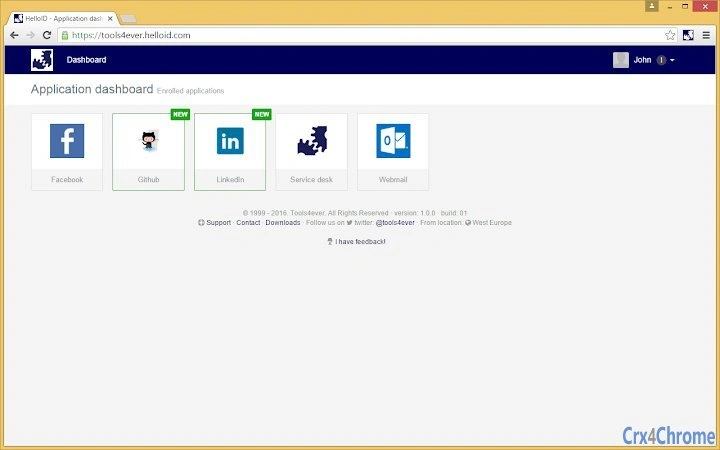
The HelloID plugin is designed to automate the process of entering login credentials on websites, eliminating the need for manual input. By storing credentials in a secure cloud environment, the tool enables users to access their account details through a dedicated portal, such as tools4ever.helloid.com. This approach enhances both efficiency and security by reducing the risk of exposure during login attempts. The plugin is particularly useful for individuals and teams managing multiple online accounts across various platforms, especially in enterprise or IT operations settings. Its integration with a cloud-based identity management system ensures that sensitive data is not stored locally, minimizing potential risks from device loss or theft. The solution targets professionals involved in digital identity management, system administrators, and users who frequently access secured web applications. Real-world use cases include automating access to internal tools, SaaS platforms, and cloud-based services where consistent login processes are required. The developer, HelloID, focuses on secure, scalable identity solutions, aligning with modern cybersecurity standards. The plugin’s functionality is centered on simplifying access while maintaining a high level of protection through centralized credential handling.
Key Features & Capabilities
- Cloud-Based Credential Storage – Login information is securely stored in a cloud environment, ensuring data is accessible from any device with portal access. This eliminates the need to manage credentials across multiple devices.
- Automated Login Entry – The plugin automatically fills login fields on supported websites, reducing time and minimizing human error during repetitive access tasks.
- Portal-Based Access Control – Users must authenticate through a designated portal (e.g., tools4ever.helloid.com) to retrieve credentials, adding an extra layer of security before access is granted.
- Integration with Identity Management Systems – Designed to work within broader identity and access management frameworks, supporting secure and compliant workflows for organizations.
- Cross-Platform Compatibility – Available for both Windows and Mac, enabling consistent performance across different operating systems.
These capabilities are especially beneficial in environments where users manage numerous accounts, such as IT teams overseeing multiple SaaS platforms or administrators handling internal tools. The automation reduces the burden of repeated logins, while the centralized portal ensures that access is governed by organizational policies. By relying on a cloud infrastructure, the plugin supports remote and hybrid work models, allowing users to maintain productivity regardless of location.
User Interface, Workflow & Performance
The user interface of the HelloID plugin is designed to operate seamlessly within web browsers, with minimal visual footprint. Users interact primarily through the browser extension interface, which appears as a small icon in the toolbar. Activation occurs automatically when a login page is detected, prompting the system to retrieve credentials via the portal. Navigation is straightforward, with no complex setup required once the initial configuration is complete. The workflow is optimized for speed, with credential filling occurring in real time during the login process. No additional user input is needed beyond the initial portal authentication. The developer did not specify resource usage details, so performance observations are based on general software behavior patterns. Stability is expected to be consistent given the plugin’s reliance on a cloud backend rather than local processing. CPU and RAM behavior are not documented, but the lightweight nature of the extension (12.5 MB) suggests minimal impact on system resources. No reported issues with crashes or freezes were mentioned in the release information.
Compatibility & System Requirements
The HelloID plugin is compatible with Windows and Mac operating systems. The software version is 1.0.0, and the installation size is 12.5 MB. Platform compatibility information is limited to these two systems, with no mention of Linux or other platforms. The developer did not provide additional system requirements, so exact hardware specifications such as RAM, CPU, or disk space are not available. Compatibility with specific web browsers was not specified. The plugin is intended for use within a browser environment, relying on the underlying browser’s security model and rendering engine. Users should ensure their browser supports extensions and has access to the required portal. No known conflicts with other software were reported. The release date of April 15, 2024, indicates a recent launch, suggesting the software is up-to-date with current web standards and security protocols.
Pros and Cons
Pros
- Secure cloud-based storage of login credentials
- Automated login entry reduces time and errors
- Centralized access via a portal enhances security
- Available for both Windows and Mac platforms
- Free to use with no licensing fees
Cons
- No local storage option for offline access
- Dependent on continuous internet connection for credential retrieval
- Requires portal authentication before accessing credentials
- Exact system requirements not disclosed
- Browser compatibility details not specified
FAQ Section
Is the HelloID plugin available for Linux?
Compatibility with Linux was not mentioned in the provided information. The plugin is currently confirmed for Windows and Mac only.
How secure is the cloud-based credential storage?
Credentials are stored in a cloud environment and accessed through a secured portal. The developer emphasizes secure access via authentication, but specific encryption standards were not disclosed.
Can I use the plugin without an internet connection?
Access to credentials requires connecting to the portal, which means an active internet connection is necessary. The plugin does not support offline credential retrieval.
What happens if I forget my portal password?
Users must rely on the portal’s recovery mechanisms. The developer did not provide details on password reset procedures.
Is the plugin free to use?
Yes, the HelloID plugin is available at no cost. There are no subscription fees or premium tiers mentioned.
Final Thoughts
The HelloID plugin presents a streamlined solution for users seeking automated, secure access to web applications. Its cloud-based credential management reduces the burden of manual logins while maintaining a strong security posture through portal-based access. The absence of local storage minimizes risks associated with device compromise, making it a suitable choice for professionals in IT, digital identity, and enterprise operations. Although it relies on an internet connection and lacks offline functionality, the trade-off is a higher level of security and centralized control. The plugin’s lightweight design and cross-platform availability further enhance its usability. For teams managing multiple accounts, this tool offers a reliable and efficient workflow. With no cost involved and a recent release date, it represents a modern, forward-thinking approach to login automation. Download HelloID plugin now.







